A Du SIM is a Subscriber Identity Module provided by Du, one of the United Arab Emirates’ major telecommunications providers.
This company offers voice calls, SMS, mobile data, postpaid plans, prepaid plans, and many other services on its nationwide network.
Your Du number is the actual phone number linked to that SIM, the number people call or text, and the one registered to your account. Knowing this number is essential when you want to:

- Give your contact info to friends or businesses
- Register for apps that require phone verification
- Recharge or manage your account
- Activate services like UAE PASS
This guide breaks every method down with steps, helpful notes, warnings, and common problems so you don’t get stuck.
What’s the Fastest Way to Check Your Du Number?
The fastest and simplest method to check your Du Number in the UAE is to dial *116# from your Du SIM.
In fact, this is an official Du number check code that shows your number on screen without the internet or any app login.
Here is a quick step‑by‑step guide to check your Du number
- Insert your Du SIM in any phone.
- Open the dial pad.
- Type *116# and press call.
- Wait a few seconds to see your number on the screen.
The good news is that this method works for both prepaid and postpaid SIMs. So, you don’t need balance or data to use this method.
Other Ways for Du SIM Number Check in the UAE
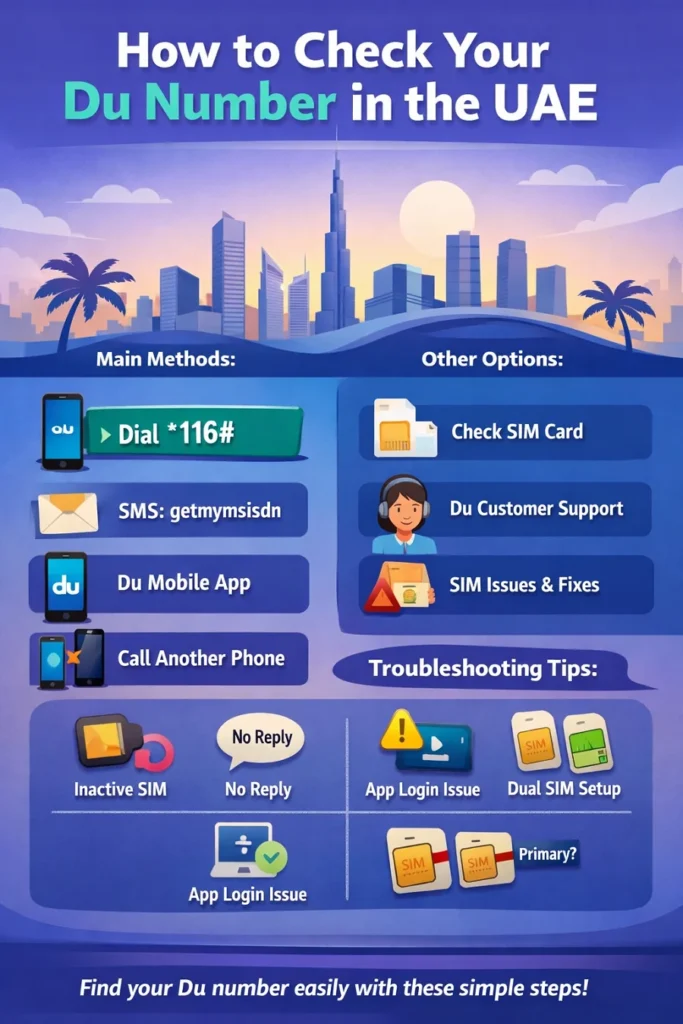
Although USSD code is the easiest method, it might not work in some rare conditions, like:
- SIM is inactive
- Your phone’s default SIM for calls is set to another card.
To fix the issue, you have to switch the default SIM to your Du line or try another phone. There are also multiple other ways to check your Du number:
Method 1: Check Du Number via SMS
If USSD doesn’t work or you prefer texting, you can use this method. Open your text messaging app and create a new message.
Now, write this message: getmymsisdn
After that, you have to send the message to: 9296
Wait for a minute to receive a message containing your Du number.
Remember that normal text messages need a minimum balance, but this method works even with a zero balance. Before sending your message, make sure that you’re using your Du SIM.
If you don’t receive my reply, recheck the text to make sure it’s correct. Then, try again after a few minutes if the network is busy.
Method 2: Check Through Du Mobile App

This is also an easy method to check your Du number if you already use the Du mobile app.
Of course, you need internet access and the app installed on your phone. Here is how to check your Du number using this method:
- Open the Du App (Android or iOS).
- Log in with your Du account.
- Go to Account or Profile.
- Your Du number is shown at the top.
This method lets you see your plan, data usage, recharge options, and many other pieces of information about your Du number. So, this is great for managing your account.
Method 3: Check the Du Number by Calling Another Phone
This might be the most non-technical method for the Du number check. You have to make a call or send an SMS to another phone.
Here is how:
- Insert your Du SIM in any phone.
- Call or message someone you trust.
- Ask them what number appears on their screen.
This simple method works anywhere you have a signal, but it needs a bit of balance for the call or SMS.
Method 4: Check Du Number from SIM Packaging or Contract
If your SIM is new or you kept the original pack:
Look here:
- On the SIM card holder or plastic/cardboard.
- In your purchase receipt or email confirmation.
This is useful if your SIM hasn’t been used yet and you’ve kept all the packaging.
Method 5: Contact the Customer Support
When all else fails, you can use this method. Here is how to reach Du:
- Dial 155 within the UAE.
- Alternatively, call Du support from another phone with international access.
Then, their support will verify your identity and help retrieve your number or assist with SIM activation issues. This may take a few minutes, but it’s reliable when other methods don’t work.
Here is a comparison between various Du number check methods:
| Method | Fast? | Easy? | Notes |
| USSD Code (*116#) | ⭐⭐⭐⭐ | ⭐⭐⭐⭐ | No internet required |
| SMS Command | ⭐⭐⭐ | ⭐⭐⭐ | Works even with a zero balance |
| Du Mobile App | ⭐⭐ | ⭐⭐⭐⭐ | Shows additional account info |
| Call Another Phone | ⭐⭐ | ⭐⭐ | Requires balance for call/SMS |
| SIM Packaging | ⭐⭐ | ⭐⭐ | Only if you kept it |
| Customer Support | ⭐ | ⭐⭐ | Best for tricky cases |
For both prepaid and postpaid, the quick USSD code usually works fastest. However, the app offers the richest account details.
How to Fix Issues When Checking a Du Number
Look at the following table to learn how to fix possible issues for checking the Du number:
| Problem | Likely Cause | Fix |
|---|---|---|
| USSD no response | Inactive SIM / wrong SIM | Restart, select Du SIM |
| No SMS reply | Wrong text / delay | Resend getmymsisdn |
| App missing number | Not logged in | Log in again |
| “Unknown number” | Phone not synced | Use *116# |
| SIM not working | Expired / deactivated | Contact Du support |
| Dual-SIM issue | Wrong default SIM | Set Du as primary |
Safety Tips When Checking Your Du Number
Although checking for the Du number is simple, there are some safety tips that you need to keep in mind:
- Official codes only: Don’t use random codes from unofficial sites.
- Protect login details: Use strong passwords for the Du app.
- Beware of phishing: Du will never ask for passwords via unsolicited SMS.
- App source matters: Download the Du app from official stores only.
Conclusion
Finding your Du number in the UAE is fast when you know where to look. For most people, dialing *116# gives an instant answer without data, balance, or apps. SMS commands and the Du mobile app offer great alternatives, and support staff can help if you’re stuck. We provided a complete guide to solve your Du SIM number questions anytime, for prepaid, postpaid, or secondary SIMs.
FAQs
How do I check my SIM number?
You need to dial *116# from your Du SIM. After that, your mobile number will instantly appear on your mobile screen.
How to check your UAE mobile number?
If you’re using Du in the UAE, dial *116# or send getmymsisdn to 9296.
How do I check my own number?
Insert your SIM into your phone and dial *116#. Also, you can call your friends if you have a balance.
Can I do a postpaid balance check?
You just need to call or text another phone.