Everything you need to know about processing your DEWA bill payment?
Dubai is a leading city in the region in terms of economy, sustainable life, and technology. You can see this leadership in almost every aspect of your life, even in utility bills.
It has come up with a different idea to inform residents and expats of their monthly charges. Instead of using a separate app or site for each utility, Dubai’s government offers a combined bill to save time and make it easy for residents to pay their bills.
In this blog post, we’ll explain what DEWA is and how DEWA Quick Pay works in 2026.

What Is a DEWA Bill?
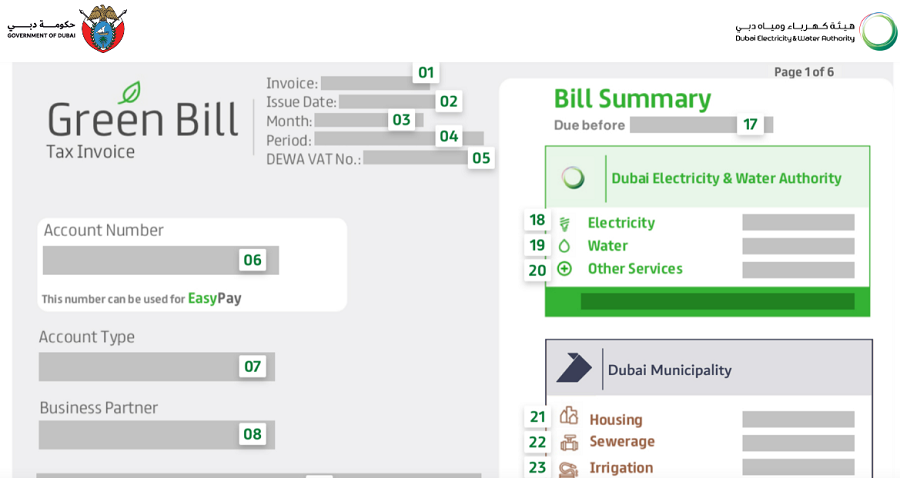
If you live in Dubai, you’ll receive a single bill for electricity and water usage plus some extra charges each month.
We call it a DEWA bill because the Dubai Electricity and Water Authority issues it to provide a clear summary of what you have consumed.
Here is what’s included in a DEWA bill in Dubai:
| Bill Component | Purpose |
|---|---|
| Electricity Charges | Cost of your electricity consumption (kWh) |
| Water Charges | Cost of your water usage (gallons) |
| Housing Fee | Your municipality fee. It’s usually 5% of your annual rent. |
| VAT | 5% value-added tax on utilities |
| Previous Balance | Any unpaid amount from earlier bills |
| Adjustments | Corrections or recalculations, if applicable |
DEWA bills are really clear to understand, so don’t worry if you’re an expat who has recently come to Dubai. The good news is that it’s available in both Arabic and English, so if your Arabic is not great, you won’t face trouble reading your DEWA bill.
Checking the DEWA bill online has several advantages that make life easier for Dubai residents.
Here are some of the most important benefits of the DEWA bill:
- Instant: A real-time access to your latest bill.
- Paperless billing: It saves trees and supports sustainability.
- Better tracking: Checking monthly and yearly expenses.
- Spotting problems: You can identify unusual consumption soon.
If you’re a tenant, the DEWA bill helps you monitor usage quickly and avoid unexpected high bills. On the other hand, landlords can track utilities for multiple properties remotely and make sure that there is no leakage.
It’s also useful for businesses in analyzing consumption trends and controlling costs efficiently.
Requirements to Check DEWA Bill Online
Before you check your DEWA bill online, you’ll need some documents and details. Depending on the platform you use, the required documents might be different.
However, you typically need to provide the following details for checking your DEWA bill:
- DEWA Account Number
- Premises Number
- Emirates ID
- Registered Mobile Number
Make sure that you access these details to have a smooth login and a quick DEWA bill payment.
How to Check DEWA Bill Online: A Step-by-Step Guide
There are three main methods to check your DEWA bill online, and then download, print, or share it.
Method 1: The DEWA Official Website
This is the most popular method and is accessible from both desktop and mobile browsers without having to install any app.
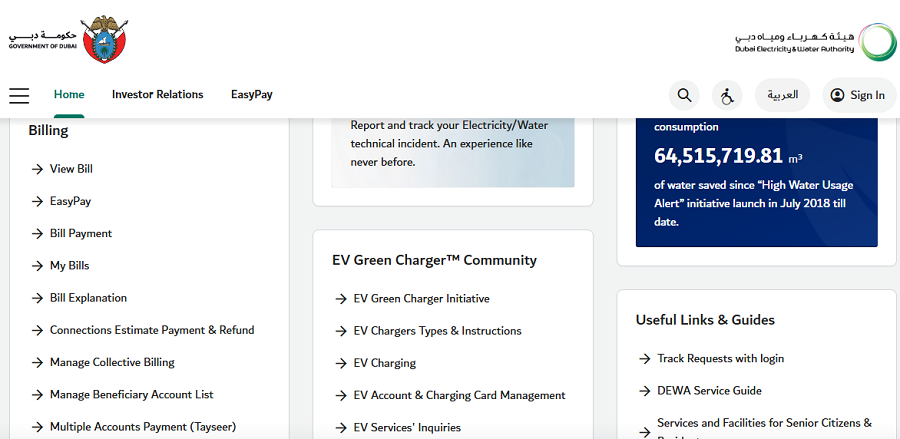
To check your DEWA bill using the DEWA website, follow these steps:
- Go to the official DEWA website.
- Find the Billing section and click “View Bill”.
- Enter your credentials.
- Select the desired billing month.
- View your detailed bill breakdown on screen.
Make sure to use the related phone number for verification.
Method 2: Using the DEWA Smart App
The DEWA Smart App is designed for users who prefer managing utilities on their phones.
How it works:
- Download the DEWA Smart App from your app store.
- Log in using your registered account details.
- Tap on My Bills or Billing History.
- View current and past DEWA bills instantly.
Key advantages:
- Access to bill history
- Consumption tracking graphs
- Push notifications for due dates
Compared to the website, the app is more convenient for frequent checks and monitoring usage trends.
Method 3: Via the DubaiNow App
DubaiNow is a unified government services app that integrates multiple services, including DEWA.
Here are the steps:
- Open the DubaiNow App.
- Log in using your UAE Pass or registered credentials.
- Navigate to Utilities > DEWA.
- Select View Bill to see your current charges.
Residents who prefer managing multiple government services, such as Salik, traffic fines, and utilities, from one app.
How to Pay Your DEWA Bill Online
Paying your DEWA bill online is fast and secure. You have multiple online payment options, including:
- Credit or debit cards
- Bank transfer
- Auto-pay (direct debit)
- Digital wallets
After payment, you’ll receive an instant SMS confirmation and a digital receipt.
What Happens If You Pay Your DEWA Bill Late?
It’s important to pay your DEWA bill on time. Remember that late payments can result in penalties and service-related consequences.
Of course, DEWA typically provides a grace period after the bill due date. Also, it sends reminder notifications before they take serious actions.
Here is a summary of what might happen if you don’t pay on time:
| Situation | Penalty |
| Missed due date | Outstanding amount carried forward |
| Continued non-payment | Late fee may be applied |
| Multiple unpaid bills | Risk of service disconnection |
| Reconnection after disconnection | Reconnection fee may apply |
The exact penalty amount can vary depending on the duration of non-payment and the total balance.
Relying on reminders might be risky, especially if you want to pay later. Here are a few simple ways to avoid penalties:
- Enable auto-pay using your bank or DEWA account.
- Set calendar or app reminders to pay the bill a few days before the due date.
- Pay immediately after receiving the bill notification.
Common Issues When Checking & Paying DEWA Bill Online
DEWA offers a clear and easy-to-use dashboard, but you might still face problems when using it.
Here is a summary of some minor problems on DEWA:
| Problem | Solution |
| Login not working | Reset password or verify mobile number |
| Bill not showing | Check selected billing period |
| App crashes | Update the app or reinstall |
| Payment failure | Try another payment method |
| Incorrect charges | Contact DEWA customer support |
Tips to Reduce Your DEWA Bill

Although the average salary of people in Dubai is really high compared to other countries, some people still face difficulties when paying bills.
If you want to save money on bills and reduce your DEWA bills, you can take the following measures:
- Use LED lighting instead of traditional bulbs
- Turn off appliances when not in use
- Fix leaking taps immediately
- Use energy-efficient appliances
- Monitor usage through the DEWA app
You might think that these methods are too simple, but even these small changes can make a big difference:
| Action | Potential Monthly Saving |
| Switching to LED lights | 10–15% |
| Reducing AC usage | 20–25% |
| Fixing water leaks | 5–10% |
Of course, the most important action you can take to reduce your energy bills is to move to an energy-efficient building.
Shozon is the best place to search for new apartments or villas that are energy-efficient and reduce your bills.
Conclusion
Dubai provides easy methods to check bills and pay your monthly charges. The DEWA bill combines your bills and municipality fees to help you manage your payments better without checking multiple apps. You can access it via its app or the website. The process is really straightforward and doesn’t need switching to other platforms. Try to pay attention to notifications and pay them on time to avoid penalties.
FAQs
How do I check my electricity bill?
You can check your electricity bill online by logging into the DEWA website, DEWA Smart App, or DubaiNow App using your DEWA account number and registered mobile number.
How to check electricity bill up?
To check if your electricity bill is updated, log in to your DEWA account and view the latest billing cycle under the “My Bills” or “Billing History” section.
How to check DEWA number UAE?
You can find your DEWA account number on previous bills, payment receipts, tenancy contracts, or by logging into the DEWA website or app using your registered details.
Does the DEWA bill come monthly?
Yes, the DEWA bill is issued monthly and includes electricity, water, housing fee, and applicable VAT charges.